CRS Meaning in Construction: Full Form, Sheet, and Drawings

Every comment raised in a review like this needs a number, an owner, and a closure date. That register is the CRS. Photo: Pixabay via Pexels.
In construction, CRS stands for Comment Resolution Sheet — the register that records every review comment raised against a drawing, specification, or submittal, along with the author's response and the reviewer's decision to close it. The full form is the whole definition: it is a sheet on which comments are resolved, one numbered row at a time.
If you saw "CRS" written on a transmittal, in a review workflow, or in a project execution plan, this is almost certainly what it means.
What CRS Means on a Construction Drawing
"CRS" appears in two different places on a construction project, and they are easy to confuse.
- CRS as the review register. A drawing is issued for review, reviewers raise comments, and each comment becomes a row on the comment resolution sheet: comment ID, drawing number, revision, reviewer, comment text, discipline, author response, status. The drawing is not approved until every row is closed.
- CRS as an abbreviation inside the drawing itself. On some structural and reinforcement drawings, "CRS" is shorthand for centres (spacing) — as in "T16 @ 200 CRS", meaning 16 mm bars at 200 mm centres. This has nothing to do with document review. Read it from context: in a schedule or rebar callout it means centres; in a transmittal, review, or document-control context it means comment resolution sheet.
If you are here because you saw it in a title block, revision history, or an email about a review, it is the comment resolution sheet.
Why Construction Projects Use a CRS
Construction reviews fail in a predictable way: comments arrive by email, in marked-up PDFs, and in meetings, and nobody can later prove which ones were addressed. The CRS exists to make that provable.
- It makes "reviewed" mean something. Approval becomes conditional on closure, not on somebody's recollection.
- It survives revisions. Comment 42 raised on Rev B stays comment 42 on Rev C until it is closed — carried forward, not silently dropped when a new file is issued.
- It is the record when a dispute arrives. Years later, the CRS is often the only document that shows who raised a concern, when, and how it was resolved. That matters for claims, variations, and defect liability.
- It stops late surprises. Open comments that vanish during design tend to resurface at commissioning or handover, when fixing them is far more expensive.
Who Raises, Answers, and Closes
Three roles, and keeping them separate is the point of the whole document.
| Role | Does what |
|---|---|
| Reviewer | Raises the comment, and is the only person who may close it |
| Author / designer | Writes the response and issues the revised deliverable |
| Document controller / review lead | Consolidates comments, keeps IDs stable, chases open rows |
The failure mode worth naming: an author marking their own comment "closed". A response is not a resolution. If the sheet lets the author close rows, the audit trail is worth very little.
What a CRS Row Looks Like
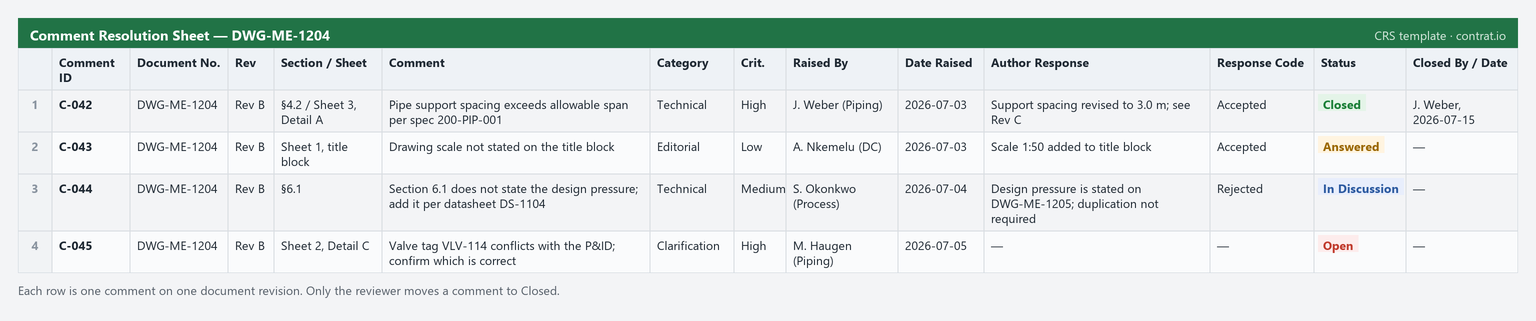
A workable row carries a permanent comment ID, the document and revision it was raised against, the reviewer, the comment, its severity or discipline, the author's response, and a status that only the reviewer can move to closed. Anything less and you cannot answer the two questions that matter: what is still open, and who agreed it was done.
For the full lifecycle — how comments move from issue to closure — see What Is a Comment Resolution Sheet?. If you want to start from a working file, there is a free CRS template in Excel. For the codes reviewers write in the status column (A, B, C, D), see Document Review Codes Explained.
Running It Without the Spreadsheet Admin
A CRS in Excel works until reviewer count and revision count grow. Then the discipline it depends on — stable IDs, honest statuses, reviewer-only closure, comments carried between revisions — becomes a job in itself, usually the document controller's.
Contrat.io enforces those rules instead of asking people to remember them: permanent comment IDs, role-based closure so authors cannot close their own comments, automatic carry-over between revisions, and an audit trail you can hand to a claims team. Free for 30 days, no credit card required.
Frequently Asked Questions
What is the full form of CRS in construction?
CRS stands for Comment Resolution Sheet. It is the register used to track review comments raised on drawings, specifications, and submittals, and to record how each one was resolved and closed.
What does CRS mean on a construction drawing?
It depends on where it appears. In a review, transmittal, or document-control context it means comment resolution sheet. Written inside a reinforcement or structural detail — for example "T12 @ 150 CRS" — it is shorthand for centres, meaning bar spacing.
Is a CRS the same as a snag list or punch list?
No. A CRS tracks comments raised during document review, before construction. A snag or punch list tracks defects found in built work, near completion. Both are closure registers, but they apply at opposite ends of the project.
Who is responsible for the CRS on a construction project?
Usually the document controller or a nominated review lead consolidates and maintains it. Reviewers raise comments, designers respond, and only reviewers close. The controller owns the sheet; they do not own the decisions recorded in it.
Do I need a CRS if we already use PDF markups?
Markups show where a comment applies; they do not show whether it was resolved, by whom, or when. Most projects use both — markups for location, the CRS as the register of record.