What Is a Comment Resolution Sheet (CRS)? Definition, Process, and Example
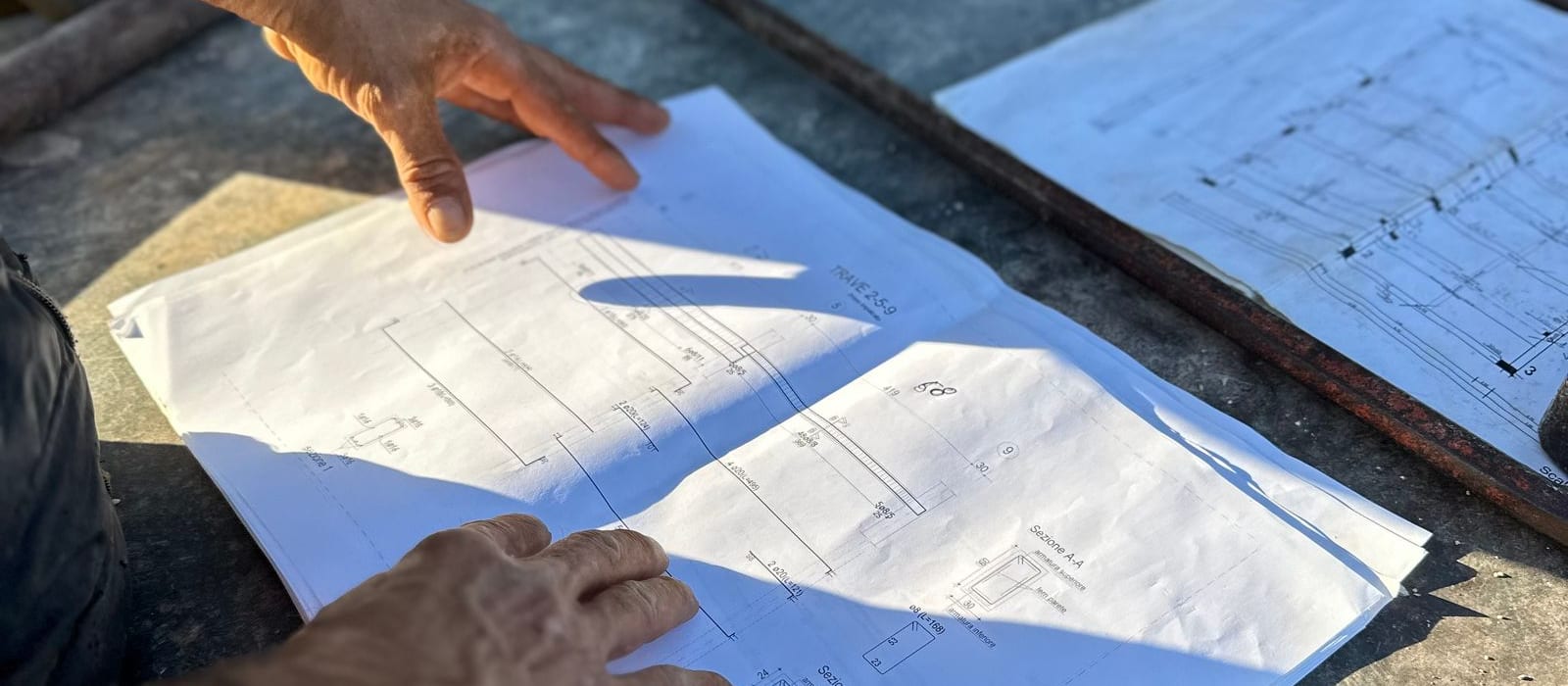
Every comment raised on a drawing needs somewhere to live — and a way to be closed. Photo: Maren Ferraro via Pexels.
In construction and engineering (AEC), CRS stands for Comment Resolution Sheet — not the tax Common Reporting Standard or Canada’s immigration Comprehensive Ranking System. This guide is about the AEC document-review kind.
Definition
A Comment Resolution Sheet (CRS) is a structured log used in Architecture, Engineering, and Construction (AEC) projects to record, track, and formally close review comments on technical documents. Each comment raised during a design review becomes one tracked entry with a unique ID, the document author's response, a response code, and a status that moves from Open to Closed only when the reviewer verifies the resolution.
You will also hear it called a comment review sheet, comment response sheet, comment log, or comment resolution log — different names for the same instrument. In EPC (Engineering, Procurement, and Construction) projects it is often a contractual deliverable: proof that every client and third-party comment was formally addressed before a document was approved for construction.
Why Projects Use a CRS
Technical documents on capital projects rarely pass review on the first submission. A drawing or specification may receive dozens of comments from multiple disciplines, and each comment is a potential design error, safety issue, or contractual gap. The CRS exists to guarantee three things:
- Nothing gets lost. Every comment has an ID and a status; an open comment is visible until someone closes it.
- Decisions are recorded. The author's response and the reviewer's acceptance form a written record of why the document says what it says.
- The review is defensible. If a dispute or claim arises years later, the CRS shows who raised what, who resolved it, and when. Email cannot do this — we explain why in Is Email Killing Your Audit Trail?
The CRS Process, Step by Step
| Step | Who | What Happens |
|---|---|---|
| 1. Submission | Author | Document revision is issued for review |
| 2. Review | Reviewers | Each discipline logs comments as individual CRS entries |
| 3. Consolidation | Lead / Document Controller | Reviewer input is merged into one sheet; duplicates and conflicts flagged |
| 4. Response | Author | Every comment gets a written response and a response code |
| 5. Resolution | Reviewers | Responses are accepted, rejected, or escalated to discussion |
| 6. Verification | Reviewers | The revised document is checked; verified comments are closed |
| 7. Close-out | Lead | All comments closed → document is approved; the CRS is archived as the audit record |
Steps 3 and 6 are where manual processes fail most often — consolidation creates conflicting copies, and verification gets skipped under deadline pressure. We cover the recurring failure patterns in 7 Mistakes You're Making with Manual CRS Workflows.
What a CRS Entry Looks Like
A minimal, well-formed CRS entry contains:
- Comment ID — permanent and never reused (e.g., C-042)
- Document number and revision the comment applies to
- Location reference — section, sheet, or detail
- The comment itself, written as a verifiable requirement
- Author response and response code (Accepted / Accepted with Comment / Rejected / Clarification Needed)
- Status — Open, Answered, In Discussion, or Closed
- Who closed it, and when
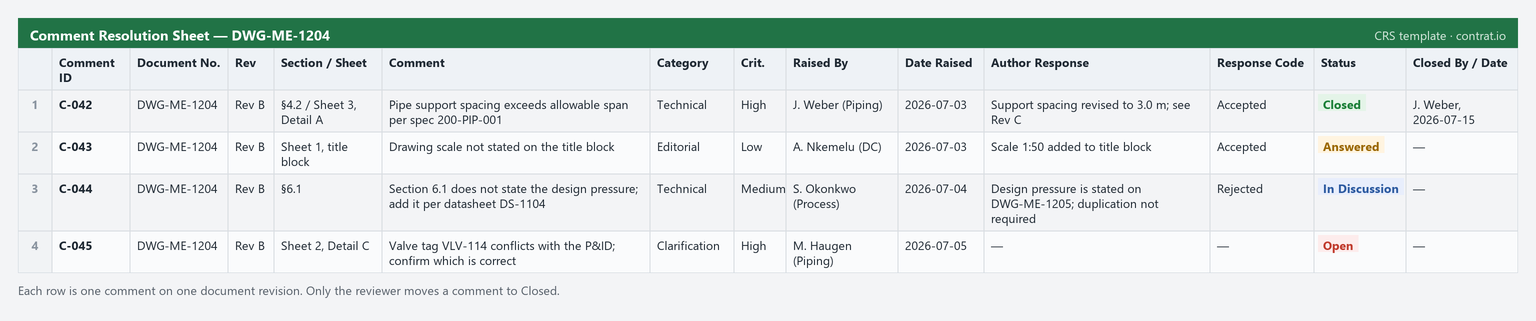
A worked comment resolution sheet. Comment C-044 shows a rejected response still In Discussion — an open item, not a closed one.
If you want a ready-made structure with all recommended columns and status codes, use our free CRS template for Excel.
CRS vs. PDF Markups vs. Email
A common misconception is that marked-up PDFs or email threads are comment resolution. They are comment creation. A markup shows what a reviewer thought; it does not track whether the issue was resolved, in which revision, and who verified it. The CRS is the lifecycle layer on top. For a full comparison of the three approaches, see Excel vs Email vs Dedicated CRS Software.
Managing a CRS Digitally
Spreadsheet CRSs work until reviewer count, revision count, or audit requirements grow. Dedicated platforms like Contrat.io make each comment a live, tracked item: statuses change only through role-based permissions, open comments carry forward automatically between revisions, reminders chase overdue responses, and every change is recorded in an audit trail. If your team is spending more time consolidating spreadsheets than resolving comments, that is the signal to switch — you can try Contrat.io free for 30 days, no credit card required.
Frequently Asked Questions
What does CRS stand for in construction?
In construction and engineering, CRS stands for Comment Resolution Sheet — a structured log that records review comments on technical documents and tracks each one from Open to Closed.
What is a comment resolution sheet used for?
It guarantees that every review comment on a drawing or specification is logged, answered, and formally closed, creating a defensible audit trail of who raised what, who resolved it, and when.
Is a CRS the same as a submittal review?
No. The submittal review is the process; the comment resolution sheet is the artifact that captures and tracks the comments raised during that review.
What is the difference between a CRS and PDF markups?
PDF markups are comment creation — they show what a reviewer thought. A CRS is the lifecycle layer that tracks whether each comment was resolved, in which revision, and who verified it.
Who owns the comment resolution sheet?
A designated lead or document controller consolidates and maintains it, while reviewers raise comments and authors respond — but only the reviewer closes a comment.