Download the CRS template
The full sheet below as a ready-to-use workbook — 13 columns, worked examples, status-code dropdowns, plus the status codes and ground rules on their own tabs.
Free Comment Resolution Sheet (CRS) Template for Excel (and How to Use It)

A CRS is a table you mark up, argue over, and have to be able to defend months later. Photo: RDNE Stock project via Pexels.
What Is a Comment Resolution Sheet?
A Comment Resolution Sheet (CRS) — sometimes called a comment review sheet, comment response sheet, or comment log — is the standard document AEC and EPC teams use to track review comments on technical deliverables. Every comment raised by a Reviewer is logged as a row, the Author responds, and the comment moves through statuses until it is formally closed. The CRS becomes the audit trail that proves every review comment was addressed before a document was approved.
If you need a working CRS structure today, this page gives you a complete template you can copy into Excel or Google Sheets, the recommended status codes, and the ground rules that keep a manual CRS from collapsing under its own weight.
The CRS Template
Copy this structure directly into Excel or Google Sheets. Each row is one comment on one document revision.
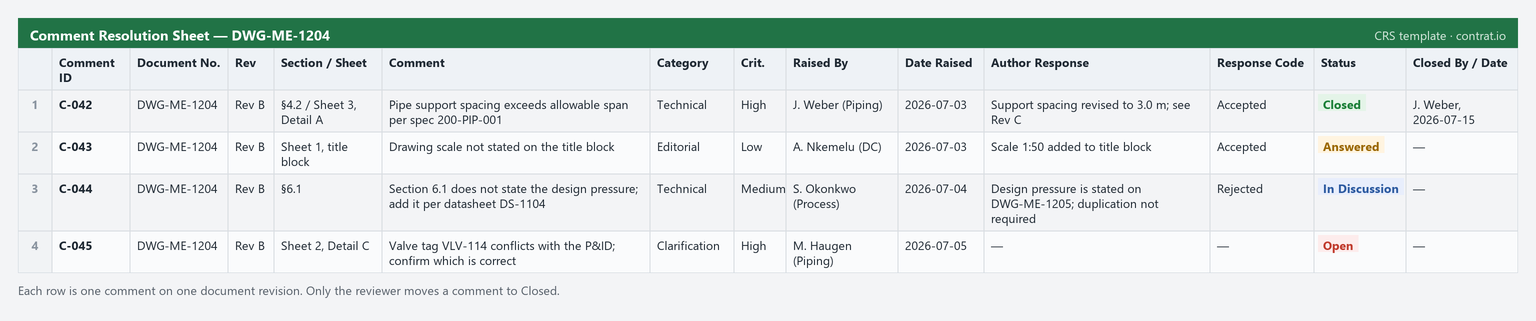
The CRS template in use: one comment per row, each carrying its own response code and status. Only the reviewer moves a comment to Closed.
| Column | What Goes In It | Example |
|---|---|---|
| Comment ID | Unique, permanent identifier. Never reuse or renumber. | C-042 |
| Document Number | The deliverable the comment applies to | DWG-ME-1204 |
| Revision | Revision of the document reviewed | Rev B |
| Section / Sheet Ref | Precise location of the issue | §4.2 / Sheet 3, Detail A |
| Comment | The reviewer's comment, stated as a verifiable requirement | Pipe support spacing exceeds allowable span per spec 200-PIP-001 |
| Category | Technical / Editorial / Clarification | Technical |
| Criticality | High / Medium / Low | High |
| Raised By | Reviewer name and discipline | J. Weber (Piping) |
| Date Raised | Date the comment was logged | 2026-07-03 |
| Author Response | The author's written response | Support spacing revised to 3.0 m; see Rev C |
| Response Code | Accepted / Accepted with Comment / Rejected / Clarification Needed | Accepted |
| Status | Open / Answered / In Discussion / Closed | Closed |
| Closed By / Date | Who verified closure, and when | J. Weber, 2026-07-15 |
Recommended Status Codes
Keep the status list short. Ambiguous statuses are the number one reason manual comment logs stop being trustworthy.
| Status | Meaning | Who Moves It Forward |
|---|---|---|
| Open | Comment raised, no response yet | Author |
| Answered | Author has responded, awaiting reviewer verification | Reviewer |
| In Discussion | Response disputed; needs a decision | Lead / Consolidator |
| Closed | Reviewer confirmed the resolution in the revised document | Nobody — closed is final |
Ground Rules That Keep a Manual CRS Alive
1. One comment per row. Compound comments ("fix the spacing and also update the title block") can be half-resolved, and half-resolved comments are the seeds of claims. Split them.
2. Only the reviewer closes a comment. The author answering is not the same as the comment being resolved. If authors can close their own comments, your audit trail proves nothing. We cover why this matters in Role-Based Permissions in AEC Collaboration.
3. The Comment ID is sacred. IDs never change between revisions. When Rev C is issued, comment C-042 must still be C-042, or cross-revision traceability dies.
4. Write comments as verifiable requirements. "Section 4 is unclear" cannot be closed objectively. "Section 4 does not state the design pressure; add it per datasheet DS-1104" can.
5. One sheet, one owner. A designated consolidator merges reviewer input. The moment two people edit parallel copies, you have two conflicting records — see 7 Mistakes You're Making with Manual CRS Workflows.
Where the Excel Template Breaks Down
An Excel CRS works for a handful of documents and a small review team. It reliably breaks when:
- Multiple reviewers comment in parallel. Consolidating three marked-up copies of the same spreadsheet is manual, error-prone work that happens on every single review cycle.
- Revisions stack up. Carrying open comments from Rev B into Rev C by copy-paste silently loses rows.
- You need proof. A spreadsheet's "last modified" date is not an audit trail. Who changed a status, when, and from what? Excel cannot tell you. This is the core problem we unpack in Is Email Killing Your Audit Trail?
- Deadlines matter. Excel does not chase reviewers. Someone has to check the sheet and send reminder emails — every day.
None of these are formatting problems, so no template fixes them. They are workflow problems.
When You Outgrow the Spreadsheet
Contrat.io is a dedicated CRS platform for AEC and EPC teams: every comment is a tracked item with a permanent ID, statuses change only through role-based permissions, revisions carry open comments forward automatically, and the full history of every comment is recorded as a defensible audit trail. You can try it free for 30 days — no credit card required — and import your existing review process in an afternoon.
Until then, this template and these rules will keep your manual CRS honest. For a deeper look at standardizing the process itself, read CRS Workflow Automation 101.
Frequently Asked Questions
Is there a free comment resolution sheet template for Excel?
Yes. Copy the table above into Excel or Google Sheets — it includes the recommended columns (Comment ID, document, revision, comment, response code, status) and status codes for a working CRS.
What columns should a comment resolution sheet have?
At minimum: a permanent Comment ID, document number and revision, a location reference, the comment, the author response, a response code, the status, and who closed it and when.
How do I track comment status in Excel?
Use a single Status column with a short, shared set of values — Open, Answered, In Discussion, Closed — and keep closure reviewer-only so the log stays trustworthy.
When should I stop using an Excel CRS?
When multiple reviewers comment in parallel, revisions stack up, or you need a real audit trail. Those are workflow problems no template fixes — that is when a dedicated CRS platform pays off.